

If you’ve ever searched for resume writing tips online, you’ve probably come across the term “ATS-friendly resume.”
The advice is almost always the same:
- Use a simple layout.
- Avoid too many graphics.
- Don’t use tables.
- Save your resume as a DOCX file.
- Include keywords from the job description.
These are all good suggestions, but they don’t tell the complete story.
While improving the resume processing engine behind atsMantra, our Applicant Tracking System (ATS), we recently came across a resume that taught us something interesting.
The resume looked completely normal.
It opened perfectly in Microsoft Word.
It opened perfectly in LibreOffice.
It passed every file integrity check.
It could even be converted into another editable document format without any issues.
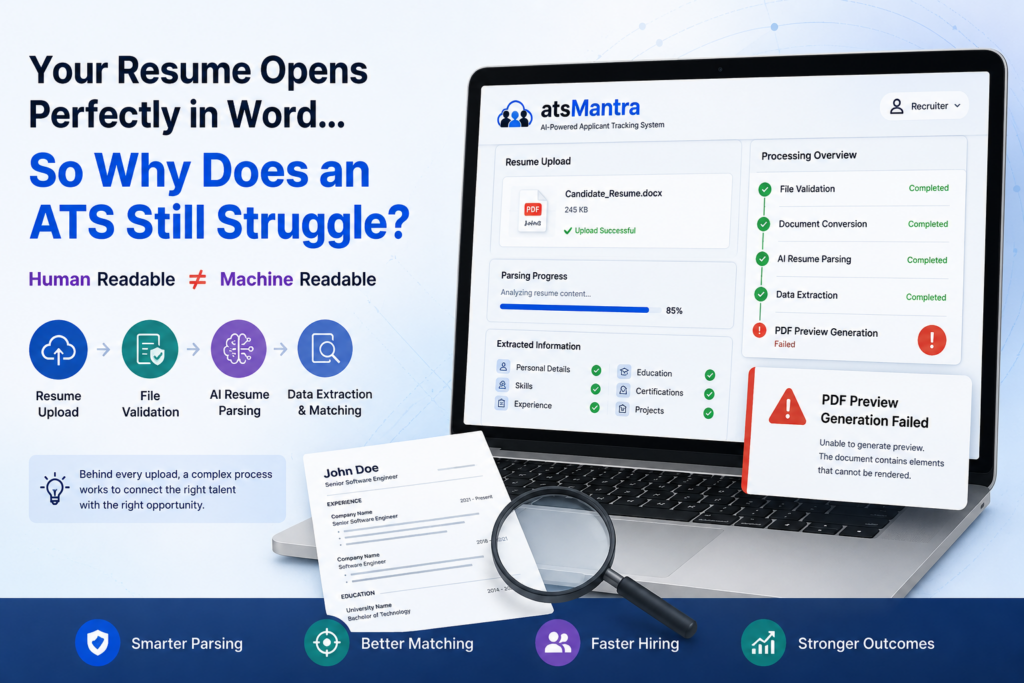
But when our ATS tried to generate a PDF preview of the resume—a common process used by many recruitment software platforms—it simply refused to complete.
That experience reminded us of an important fact.
Just because a resume looks perfect to a human doesn’t always mean it’s easy for software to understand.
What Does an Applicant Tracking System Actually Do?
Many people believe an Applicant Tracking System is simply a place where recruiters store resumes.
In reality, modern ATS software does much more.
The moment you upload your resume, several automated processes begin working in the background.
A typical workflow looks something like this:
Resume Upload
↓
File Validation
↓
Document Processing
↓
Resume Parsing
↓
AI-Based Skill Extraction
↓
Experience & Education Detection
↓
Candidate Search & Matching
↓
Recruiter Review
Every one of these steps depends on one thing:
Your resume must be readable not only by people but also by software.
Human-Friendly Doesn’t Always Mean Machine-Friendly
When a recruiter opens your resume, they instantly understand the information because the human brain is incredibly good at interpreting layouts and formatting.
Software works differently.
An AI resume parser or Applicant Tracking System has to understand the structure of the document before it can identify important information such as:
- Name
- Contact details
- Skills
- Work experience
- Education
- Certifications
- Projects
- Achievements
To do that, it also has to interpret:
- Fonts
- Headings
- Lists
- Tables
- Images
- Document styles
- Hidden formatting
- Metadata
The more complex a document becomes, the harder it can be for software to process consistently.
Fortunately, modern AI has become much better at understanding resumes, but even the best systems occasionally come across documents that present unexpected challenges.
Why Resume Formatting Still Matters
One of the biggest misconceptions is that ATS-friendly only means adding the right keywords.
Keywords are important, but they are only one part of the equation.
Your resume should also be:
- Easy to read
- Properly structured
- Consistently formatted
- Free from unnecessary formatting complexity
A resume that has been edited repeatedly over several years, copied between multiple templates, or built using excessive formatting may still look perfect on screen while becoming much harder for software to process.
Why This Matters for Recruiters
Modern recruitment teams receive hundreds—or even thousands—of resumes for a single hiring campaign.
To manage this volume efficiently, ATS platforms rely on automation.
Today’s recruitment software doesn’t simply store resumes. It can:
- Generate resume previews
- Extract candidate information
- Parse work experience
- Identify skills
- Match candidates against job descriptions
- Perform AI-powered resume screening
- Enable advanced candidate search
If a resume cannot be processed correctly, some of these automated features may not work as effectively.
Thankfully, situations like this are rare, but they highlight why document quality is just as important as document design.
How to Make Your Resume More ATS-Friendly
Whether you’re actively looking for a job or simply keeping your resume updated, following a few simple practices can improve compatibility with almost every Applicant Tracking System.
✔ Use a recent version of Microsoft Word or another reliable document editor.
✔ Keep formatting clean and consistent.
✔ Avoid unnecessary graphics, floating text boxes, and decorative elements.
✔ Use commonly available fonts.
✔ Save a fresh copy instead of continuously editing the same document for years.
✔ Always review both the DOCX and PDF versions before submitting your application.
These simple steps improve both readability and machine compatibility.
The Future Is About Machine-Readable Resumes
As Artificial Intelligence becomes a bigger part of recruitment, resume processing is evolving rapidly.
Today’s AI-powered Applicant Tracking Systems don’t just search for keywords. They understand context, identify skills, analyse experience, and help recruiters find the right candidates much faster.
But every AI system still depends on one thing:
A well-structured, machine-readable document.
Perhaps it’s time we stop thinking only about creating an ATS-friendly resume.
Instead, we should focus on creating machine-readable resumes—documents that are easy for recruiters to read and equally easy for modern recruitment software and AI to understand.
Final Thoughts
The resume that inspired this article eventually taught us something much more valuable than a technical lesson.
It reminded us that every resume is unique.
Behind every upload is a document created using different templates, different software, and different editing habits.
Building an Applicant Tracking System that can successfully process this incredible variety is far more challenging than it appears—and that’s exactly the kind of challenge we enjoy solving at RARR Technologies.
Every edge case helps us improve atsMantra, making it smarter, more reliable, and better prepared for the diverse resumes that recruiters receive every day.

Nishant Kapoor leads IT and Customer Success at RARR Technologies, where he plays a key role in shaping atsMantra’s product experience and customer journey. With a strong focus on recruitment technology, digital workflows, and client success, he brings practical perspectives to industry challenges. On the atsMantra blog, Nishant shares insights not only on optimizing hiring processes but also on broader topics around business growth, productivity, and tech-driven innovation.